Someone asked this on Stack Exchange on 29 August and it is still sitting there unanswered: how do you SUM() a field over more than fifty thousand records inside a batch job? The shape is familiar. A few million Invoice__c rows, a total wanted per account, and batch Apex reached for because that is what you reach for when a number is large.
Then Database.getQueryLocator refused the query, and the error did not explain itself.
Two different ceilings are in the way here. Most of the answers you will find online conflate them, which is why the advice is usually wrong in a way that works fine in a sandbox with nine hundred accounts in it.
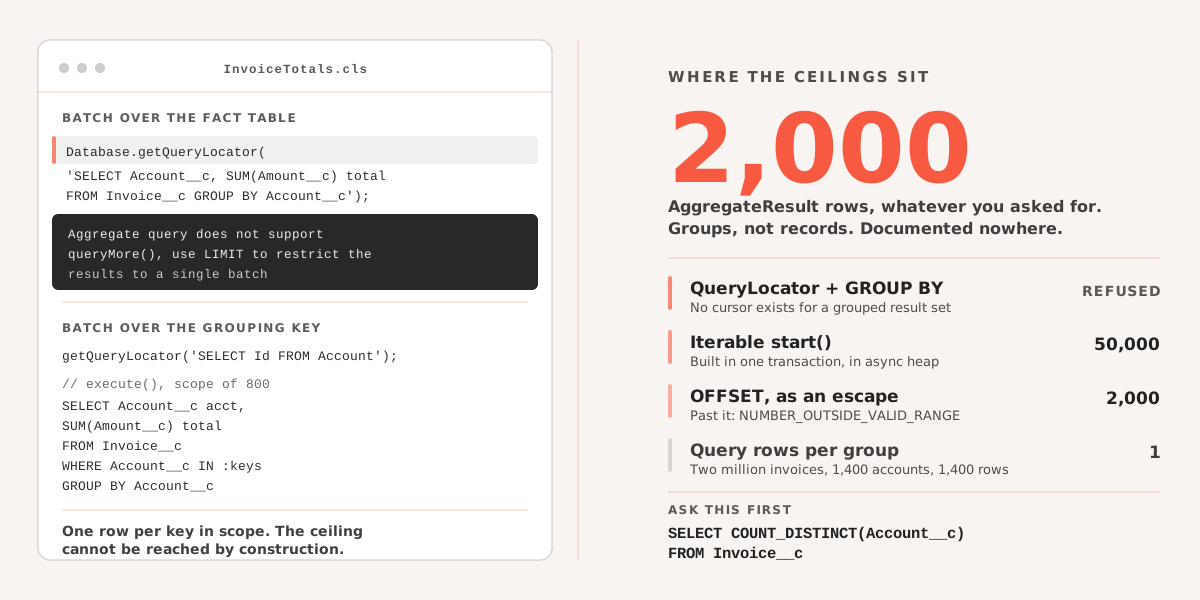
The locator will not take a GROUP BY
Start with the thing that fails immediately:
global Database.QueryLocator start(Database.BatchableContext bc) {
    return Database.getQueryLocator(
        'SELECT Account__c, SUM(Amount__c) total FROM Invoice__c GROUP BY Account__c'
    );
}
That throws at runtime, not at compile time:
Aggregate query does not support queryMore(),
use LIMIT to restrict the results to a single batch
The reason is in the SOQL reference rather than the Apex one, which is part of why nobody finds it. Under considerations for GROUP BY: queries with a GROUP BY clause cannot use the queryMore() call to get more results, and in REST terms, cannot use the query locator to get more results at all.
A QueryLocator is a server-side cursor that pages with queryMore(). That is the entire mechanism by which batch Apex reaches fifty million records. A grouped result set has no such cursor, because the grouping is computed for the result you asked for and there is nothing to resume from. So the two are structurally incompatible, and no amount of LIMIT fiddling changes it.
So start() returns an Iterable, and the ceiling drops by three orders of magnitude
The workaround everyone lands on is the other Batchable signature. Return an Iterable<SObject> instead, built from the aggregate query, and let batch Apex chunk the list you hand it.
It works. It also quietly moves you from a cursor over fifty million rows to a list built inside one transaction, which means the fifty-thousand-row query limit now applies to the whole job, not to a chunk of it. AggregateResult rows are still SOQL rows.
There is a second cost that nobody mentions: start() is asynchronous, so the entire list has to fit in asynchronous heap. That was 12 MB and is 25 MB on a Winter ’27 org, which we wrote about yesterday. Better than it was. Still a list, still resident, still nothing like a cursor.
The second ceiling, which applies everywhere
An aggregate query returns 2,000 rows. Not 2,000 records summarised — 2,000 groups. Ask for a total per account across four thousand accounts and you get two thousand of them.
This limit is not in the GROUP BY reference page, it is not in the SOQL limits page, and it is not in the aggregate functions page. It is real, everyone who has worked with AggregateResult at volume knows it, and the way most people learn it is by comparing an Apex total against a report and finding they disagree.
OFFSET looks like the escape. It is not much of one: the maximum offset in SOQL is 2,000, and asking for more returns NUMBER_OUTSIDE_VALID_RANGE. So paging buys you exactly one extra page. Four thousand groups, then a wall.
While we are on things that are true and undocumented in the same place: GROUP BY does not accept a formula field, and it does not accept any field whose describe says it is not groupable. If you are grouping by something computed, the aggregate is not available to you at all and the rest of this post is moot.
Ask how many groups there are before designing anything
This is one query, it costs nothing, and it decides the whole architecture:
SELECT COUNT_DISTINCT(Account__c) FROM Invoice__cOne row back, one number in it. Under 2,000 and a plain aggregate query is the right answer and always was — the size of the underlying table is irrelevant, because a grouped query consumes one query row per group returned, not one per record scanned. Two million invoices collapsing into 1,400 accounts consumes 1,400 rows of your fifty thousand. That arithmetic surprises people who have spent a career avoiding large queries.
Over 2,000 and you need to partition. The interesting question is what you partition on.
Partition by the grouping key, not by the fact table
The instinct is to batch over Invoice__c, since that is where the rows are, and accumulate totals in a Database.Stateful map. It works and we would not write it. A given account’s invoices are spread across arbitrary chunks, so every group straddles chunk boundaries, so nothing is final until the last execute() has run. The map has to hold every key for the duration and gets serialised and restored between chunks. On a job with a hundred thousand distinct accounts, that map is the largest thing in the transaction, and it dies somewhere in the last third of a run you have already waited two hours for.
Batch over the key instead:
global Database.QueryLocator start(Database.BatchableContext bc) {
    // Accounts. A locator pages these happily -- no aggregate involved.
    return Database.getQueryLocator('SELECT Id FROM Account WHERE Has_Invoices__c = true');
}

global void execute(Database.BatchableContext bc, List<Account> scope) {
    Set<Id> keys = new Map<Id, Account>(scope).keySet();

    for (AggregateResult ar : [
        SELECT Account__c acct, SUM(Amount__c) total
        FROM Invoice__c
        WHERE Account__c IN :keys
        GROUP BY Account__c
    ]) {
        Id acct    = (Id) ar.get('acct');
        Decimal amt = (Decimal) ar.get('total');
        // ...
    }
}
Two properties fall out of that and both matter.
The aggregate can never exceed the ceiling, because it returns at most one row per key in scope and the maximum batch scope is 2,000. The limit stops being something you monitor and becomes something the design forbids. And every group is complete inside its own chunk, so there is no stateful accumulation, no serialised map, and a failed chunk costs you that chunk rather than the run.
Tune scope against invoices per account, not against accounts. Two thousand accounts averaging sixty invoices each is a hundred and twenty thousand rows scanned per chunk. The returned rows are only 2,000 so the row limit is fine, but selectivity is not: an unindexed or non-selective filter on a large object throws System.QueryException: Non-selective query against large object type and it throws on chunk 40, not chunk 1.
Two smaller things that cost people an afternoon each. Alias every aggregate column, or it comes back as expr0 and the next person to touch the class has to run it to find out what it holds. And SUM() hands back a Decimal even when the field it summed has no decimal places, so (Integer) ar.get('total') compiles cleanly and throws System.TypeException the first time anyone runs it.
HAVING is worth remembering too, because it filters after aggregation. If the job only cares about accounts over ten thousand in invoices, HAVING SUM(Amount__c) > 10000 may take a query that was never going to fit under 2,000 groups and make it fit, without any partitioning at all. It is not a general answer. It is a good one when the report has a threshold in it, which reports usually do.
Where we stop fighting Apex
There is a point past which this is the wrong tool. Somewhere around a few hundred thousand groups, or an aggregate that has to join two objects, or a finance team that wants the same total sliced six ways and does not want to wait for a batch job.
Apex cannot do a nested aggregate. It cannot aggregate across two objects in one query. It cannot page a grouped result set, for the structural reason at the top of this post, and it will not grow the ability to. Every pattern above is a way of arranging Apex around a database feature Salesforce did not expose, and each one costs you a class that somebody has to maintain and a test that somebody has to keep passing.
The alternative is to put the rows somewhere that does have a grouped cursor. SELECT account_id, sum(amount) FROM invoice GROUP BY 1 in Postgres has no group ceiling, no fifty-thousand-row limit and no chunk boundaries, and it returns in the time the batch job spends enqueueing. That trade is a sync to run and maintain, so it is not free either. It is just honest about where the arithmetic happens.
Run the COUNT_DISTINCT first. It answers the question in one query, and it is the only number in this post that is about your org rather than about Salesforce.
Getting Salesforce records into Postgres so the arithmetic can happen there is what AlgoBridge does, and we are happy to say when a batch class is the cheaper answer. Get in touch if you are staring at an aggregate that will not fit, or read our older note on relationship queries, aggregates and semi-joins for the syntax this post assumes.