Most SOQL that hits governor limits does so because it asks the database for too little, not too much. A query returns raw rows, Apex loops over them, and a second query runs inside the loop. Four features let you push that work down into the query itself.
The examples below use a custom Invoice__c object with a lookup to Account.
Relationship queries
You do not need a second query to reach a related record. The __r suffix traverses the relationship in one hop:
SELECT Id, Name, Amount__c FROM Invoice__c WHERE Account__r.Name = 'Acme'Account__c is the lookup field; Account__r is the relationship you filter and select through. You can traverse up to five levels upward from a child record, which covers nearly everything short of a deliberately baroque data model.
The reverse direction — parent to children — uses a subquery:
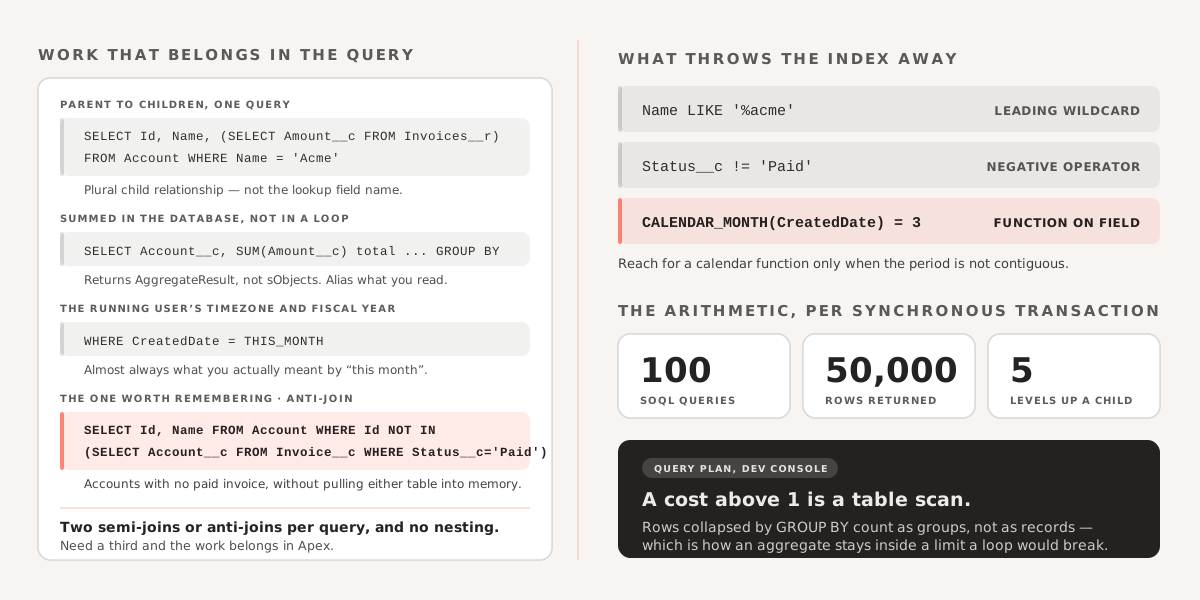
SELECT Id, Name, (SELECT Id, Amount__c FROM Invoices__r) FROM Account WHERE Name = 'Acme'That returns each account with its invoices attached, in one query instead of one query per account. Note the plural Invoices__r: child relationship names differ from the lookup field name, and getting it wrong is the most common reason this fails to compile.
Aggregate functions
SUM(), AVG(), MAX(), MIN() and COUNT() summarise in the database rather than in a loop:
SELECT SUM(Amount__c) FROM Invoice__cAggregate queries return AggregateResult objects, not sObjects, so read the values with get(). Alias anything you intend to read by name:
SELECT Account__c, SUM(Amount__c) total FROM Invoice__c GROUP BY Account__cThe practical win is the limit arithmetic. Rows collapsed by GROUP BY count as the number of groups returned, not the number of underlying records, so an aggregate over a large table stays well inside the 50,000-row query limit where the equivalent loop would not.
Date filtering
For anything expressible as a standard period, use a date literal rather than building the range yourself:
SELECT Id, Name, Amount__c FROM Invoice__c WHERE CreatedDate = THIS_MONTHTHIS_MONTH, LAST_N_DAYS:30, THIS_FISCAL_QUARTER and the rest are evaluated against the running user’s timezone and fiscal year settings, which is almost always what you actually meant.
Reach for the calendar functions only when the period is not contiguous — every March across all years, say:
SELECT Id, Name FROM Invoice__c WHERE CALENDAR_MONTH(CreatedDate) = 3Be aware of the tradeoff: applying a function to a field makes that filter non-selective, so the query cannot use the index on CreatedDate. On a large object, the date literal is meaningfully faster.
Semi-joins and anti-joins
A semi-join finds records that have a related record matching some criteria. An anti-join finds those that do not.
SELECT Id, Name FROM Account WHERE Id IN (SELECT Account__c FROM Invoice__c)SELECT Id, Name FROM Account WHERE Id NOT IN (SELECT Account__c FROM Invoice__c WHERE Status__c = 'Paid')The second query — accounts with no paid invoice — is the one worth remembering, because the Apex equivalent means pulling both object’s records into memory and diffing them.
Two constraints apply. You get a maximum of two semi-joins or anti-joins per query, and the subquery cannot itself contain one. If you find yourself needing a third, the query is doing work that belongs in Apex.
Before you optimise anything, look at the plan
The Query Plan tool in the Developer Console (enable it under Preferences) shows which index, if any, a query will use, and gives each plan a cost. Anything above 1 is a table scan.
Two things move the cost more than anything else: filtering on an indexed field — Id, Name, CreatedDate, lookups, external IDs, and anything explicitly indexed — and avoiding leading wildcards, negative operators, and functions wrapped around the filtered field, all of which discard the index.
The rest is limit arithmetic worth committing to memory: 100 SOQL queries per synchronous transaction, 50,000 rows returned. Queries inside loops break the first. Unfiltered queries on large objects break the second.
If you are running into data retrieval performance issues or hitting governor limits in a larger org, we are happy to take a look.