There is a version of this story going around that is wrong, and it is wrong in a way that will cost somebody a weekend.
The version going around is “Salesforce is retiring the SOAP API.” It isn’t. The SOAP API is fine. Your query() calls, your upsert() calls, the partner WSDL your middleware was built against fifteen years ago, all fine. What is being retired is one operation: login(). The one that takes a username, a password, and a security token, and hands back a session ID.
That is a much smaller thing to break, and a much harder thing to find.
What is actually going away
login() is available in API versions 31.0 through 64.0. It is already absent from 65.0 and everything after. The operation is scheduled for retirement in Summer ’27, at which point calling it against any version returns an error instead of a session.
This is the third round of this. Versions 7.0 through 20.0 were retired in Summer ’22. Versions 21.0 through 30.0 went in Summer ’25. If your org survived both of those without incident, that is worth knowing, because it probably means somebody already did an inventory and you may be able to find their notes.
The thing to hold onto: after Summer ’27, a SOAP integration still works. It just has to get its session from somewhere else.
The fix is smaller than you expect
Because only the authentication step is changing, most integrations need a change in one place. The code that builds the envelope, parses the response, handles the fault codes, all of that survives. You swap how the session ID is acquired and you keep everything downstream.
In practice that means moving to OAuth 2.0, through an External Client App, using one of three flows:
- JWT bearer flow for server-to-server integrations with no user present. This is the right default for a nightly job, a middleware connection, a CI pipeline.
- Client credentials flow where you want the integration to run as a specific named user and you would rather manage a secret than a certificate.
- Web server flow where an actual human authorises the connection once.
For a scheduled integration, JWT bearer is almost always the answer. You generate a key pair, upload the certificate to the External Client App, and sign a short-lived assertion at runtime:
POST /services/oauth2/token
grant_type=urn:ietf:params:oauth:grant-type:jwt-bearer
assertion=<RS256-signed JWT>
with iss set to the consumer key, sub to the integration user, aud to the login host, and an exp a few minutes out. What comes back is an access token that your existing SOAP calls will accept in the session header exactly where the old session ID used to go.
No password. No security token. No 90-day reset that silently breaks a job nobody is watching.
Finding the callers is the hard part
Here is where the weekend goes. The change is one line in each integration. The problem is that nobody knows how many integrations there are.
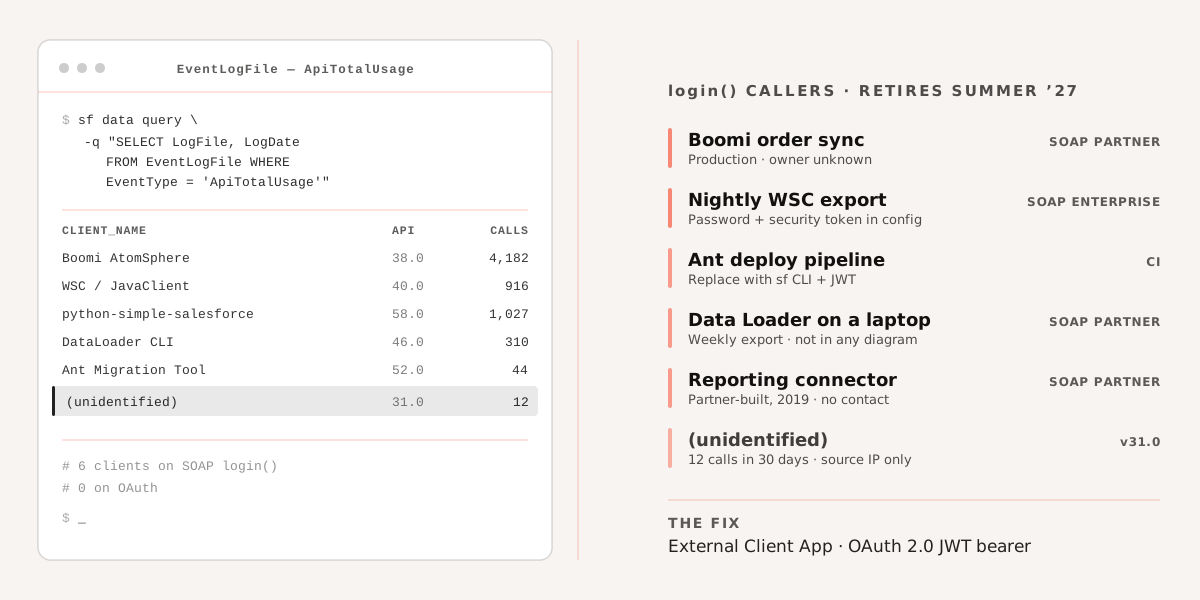
Every org that has been running for more than about five years has accumulated callers that are not in any inventory: a reporting tool somebody’s predecessor connected, an Ant script in a repository that still deploys, a Boomi process built by a partner who is no longer engaged, a Data Loader install on a laptop that runs a weekly export. None of these are in your architecture diagram. All of them authenticate with login().
There are four places to look, and you want all four.
Event Log Browser. Setup → Security → Event Monitoring → Event Log Browser, then pull the ApiTotalUsage event type. This is the most complete source you have. If Event Monitoring is enabled you get 30 days; otherwise 24 hours, which is still enough to catch anything that runs daily. The fields that matter are CONNECTED_APP_NAME, USER_NAME, CLIENT_NAME, API_FAMILY and API_RESOURCE. CLIENT_NAME is the one that identifies the mystery integrations, because it carries whatever the client library announced itself as.
Same data from the CLI, which is easier to work with:
sf data query \
  -q "SELECT Id, LogFile, EventType, LogDate FROM EventLogFile WHERE EventType = 'ApiTotalUsage'" \
  -o your-org-alias
then fetch each LogFile and grep it. A 30-day window on a busy org produces a lot of rows, so filter to distinct combinations of CLIENT_NAME and USER_NAME first and work from that list. It is usually shorter than people expect and longer than they hoped.
Login History. Setup → Login History, filtered on the Application column for SOAP Enterprise and SOAP Partner. Every login() call produces a row here. This catches things the event logs might miss if your retention window is short, and it gives you the source IP, which is often how you finally work out what a mystery integration user actually is.
Bulk Data Load Jobs. Setup → Bulk Data Load Jobs shows the API version each job was submitted with. Old versions here point at old tooling, and old tooling is where password authentication lives.
Your own repositories. Grep for the endpoint shape rather than the word “login”, because the word is everywhere:
grep -rniE "services/Soap/[uc]/[0-9]{1,2}\.[0-9]" .
grep -rniE "sf(dc)?_?(username|password|security_?token)" .
The second one finds the credentials, which is frequently faster than finding the code. A username, a password and a security token sitting together in a config file is a login() caller with near certainty.
The tools that will bite you
Some of these you own and some of them you only think you own.
The Ant Migration Tool authenticates with username and password. If it is still in a pipeline somewhere, that pipeline stops. Salesforce CLI with a JWT-authorised connection is the replacement, and if you are still deploying with Ant in 2026 the migration is overdue for reasons beyond this one.
Data Loader is fine if it is current and you use OAuth. An old install running in command-line mode with an encrypted password in process-conf.xml is not.
Web Services Connector, the Java library, needs a recent version and an OAuth-supplied session. Anything built on an old WSC jar with new PartnerConnection(config) and a password in the config is a caller.
Middleware connectors are the ones to check first, because they are the ones running in production with the most business behind them. Boomi, Jitterbit, Informatica and MuleSoft all have Salesforce connectors that can be configured either way, and the older the configuration, the more likely it is on basic auth. The connector will support OAuth. Somebody just has to change it, test it, and get it through a release window.
Outbound Messaging is a special case and mostly not your problem, since it sends a session ID to your endpoint rather than calling login(). Check the API version on the outbound message definition anyway while you are in Setup.
What to do with the next two hours
Not the next twelve months. Two hours is enough to know how bad it is, and knowing how bad it is changes whether this is a ticket or a project.
Pull 30 days of ApiTotalUsage. Filter Login History to the two SOAP application types. Put the distinct integration users in a spreadsheet with a column for “what is this” and a column for “who owns it”. Then start filling in the second column, because that is the one that takes weeks and it is the one that has nothing to do with engineering.
The migration work itself is small and boring. Certificate, External Client App, one auth function per integration, a test in a sandbox. The scheduling is the hard bit: a middleware connector change needs a maintenance window, and a partner-built integration needs a partner who still returns emails.
Summer ’27 sounds far away. It is roughly three releases, and one of them lands in the middle of everyone’s freeze period.
We do this kind of inventory as a fixed-scope engagement, usually a week, ending with a list of every caller and a migration order. If you would rather run it yourself, the queries above are the whole method. Talk to us if the ownership column turns out to be the problem, or read our older walkthrough of OAuth and connected app setup for the flow mechanics.