Salesforce exposes the same data through both a REST and a SOAP API. For a new Node.js integration, use REST. It speaks JSON, it needs no WSDL, and every recent platform feature lands there first.
SOAP is still worth knowing for two situations: middleware that wants a formal WSDL contract before it will talk to anything, and the handful of operations that were never given a REST equivalent. Outside of those, the choice is not close.
Authenticate first
Every call below needs an access token and an instance URL. How you get them depends on what is calling:
- A server-to-server integration — no user at a keyboard — should use the JWT bearer flow or the client credentials flow. Both authenticate the application itself, with no interactive login and no stored password.
- Anything acting on behalf of a user should use the web server flow. We covered that setup in detail in Setting Up Salesforce OAuth.
The username-password flow that older examples reach for — posting a username, password, and security token to the token endpoint — is disabled by default in new orgs and on a deprecation path. Do not build anything new on it.
Whatever the flow, the token response carries an instance_url. Every API call goes to that host, not to login.salesforce.com.
Querying with REST
SOQL queries go to the query endpoint. This is the one people get wrong most often — the sobjects endpoint does not accept a query parameter, and passing one there returns a confusing 404 rather than a helpful error:
const params = new URLSearchParams({
  q: 'SELECT Id, Name FROM Account WHERE CreatedDate = THIS_MONTH',
});

const response = await fetch(`${instanceUrl}/services/data/v57.0/query?${params}`, {
  headers: { Authorization: `Bearer ${accessToken}` },
});

const { records, totalSize, done, nextRecordsUrl } = await response.json();
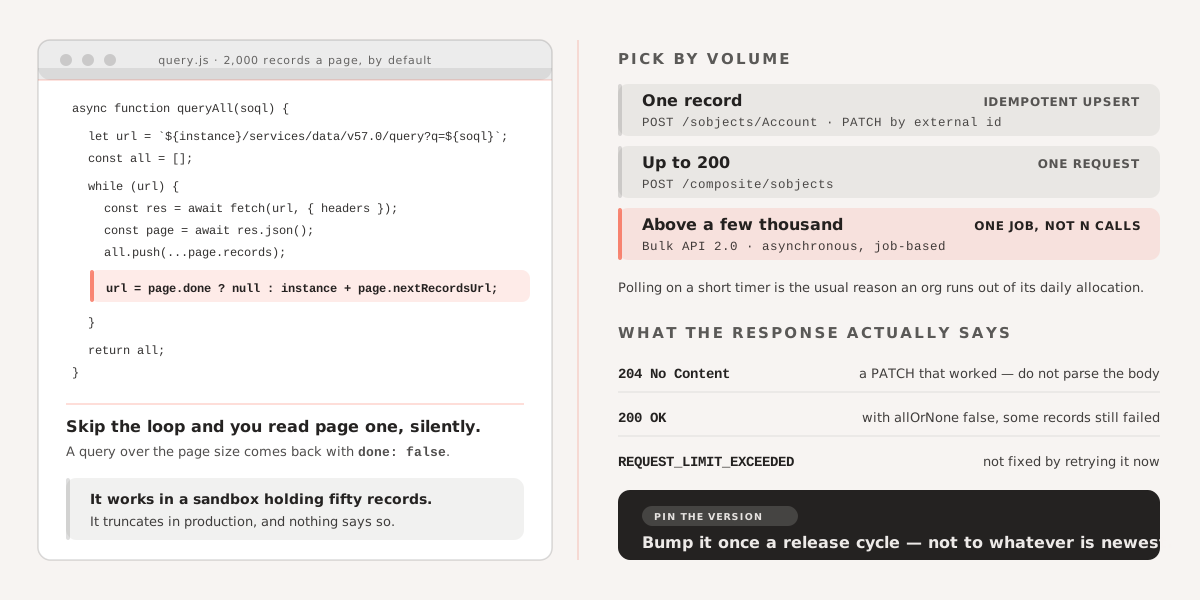
Note done and nextRecordsUrl. Salesforce pages results — 2,000 records at a time by default — and a query returning more comes back with done: false. Follow nextRecordsUrl until it flips:
async function queryAll(soql) {
  const params = new URLSearchParams({ q: soql });
  let url = `${instanceUrl}/services/data/v57.0/query?${params}`;
  const all = [];

  while (url) {
    const res = await fetch(url, { headers: { Authorization: `Bearer ${accessToken}` } });
    const page = await res.json();
    all.push(...page.records);
    url = page.done ? null : `${instanceUrl}${page.nextRecordsUrl}`;
  }

  return all;
}
Integrations that skip this silently process the first page and ignore the rest. It is a quiet bug — everything works in a sandbox with 50 records and truncates in production.
Creating and updating single records
A create is a POST to the object’s collection:
const response = await fetch(`${instanceUrl}/services/data/v57.0/sobjects/Account`, {
  method: 'POST',
  headers: {
    Authorization: `Bearer ${accessToken}`,
    'Content-Type': 'application/json',
  },
  body: JSON.stringify({ Name: 'Acme Corp', Industry: 'Manufacturing' }),
});

const result = await response.json();  // { id, success, errors }
An update is a PATCH to the record’s own URL, and returns 204 No Content with an empty body — so do not call response.json() on it unconditionally, which is a reliable way to produce a confusing parse error on a request that actually succeeded.
If the record originated in another system, prefer upsert by external ID over a create followed by an update. It is one call, and it is idempotent — a retry after a network timeout cannot produce a duplicate:
await fetch(
  `${instanceUrl}/services/data/v57.0/sobjects/Account/External_Id__c/${externalId}`,
  { method: 'PATCH', headers, body: JSON.stringify(fields) },
);
Multiple records in one call
The composite endpoint handles up to 200 records per request:
const payload = {
  allOrNone: true,
  records: rows.map((row) => ({ attributes: { type: 'Account' }, ...row })),
};

const response = await fetch(`${instanceUrl}/services/data/v57.0/composite/sobjects`, {
  method: 'POST',
  headers: { Authorization: `Bearer ${accessToken}`, 'Content-Type': 'application/json' },
  body: JSON.stringify(payload),
});
allOrNone is the decision worth making consciously. With true, one bad record rolls back all 200. With false, the good records commit and the response tells you which failed — which means you must actually read the per-record results, because the HTTP status will be 200 either way.
Above a few thousand records, stop using composite and use the Bulk API 2.0, which is asynchronous and job-based. Composite calls count against your API request limit individually; a Bulk job counts as one.
The SOAP version
If you do need SOAP, the soap package handles the WSDL. Log in first, then use the returned session ID and server URL for subsequent calls:
const soap = require('soap');

const client = await soap.createClientAsync(wsdlUrl);

const [loginResult] = await client.loginAsync({
  username,
  password: password + securityToken,
});

const { sessionId, serverUrl } = loginResult.result;

client.setEndpoint(serverUrl);
client.addSoapHeader({ SessionHeader: { sessionId } });

const [createResult] = await client.createAsync({
  sObjects: [{
    'ogc:type': 'Contact',
    FirstName: 'John',
    LastName: 'Doe',
    Email: 'johndoe@example.com',
  }],
});
Two details. The security token appends directly to the password with no separator, and it is only needed when the calling IP is outside the org’s trusted ranges. And the serverUrl returned by login is the endpoint for everything afterwards — the WSDL’s default endpoint points at the login server, not your instance.
Unlike REST, SOAP is XML only. There is no JSON option.
Limits that shape the design
API request allocation. Orgs get a fixed number of API calls per rolling 24-hour window, based on edition and license count. Watch it in Setup under Company Information, or read Limits from the REST API. Integrations that poll on a short timer are the usual reason orgs run out.
Versioning. Pin an explicit version in your URLs, as above. Salesforce retires old API versions on a published schedule, and unversioned or ancient calls eventually stop working. Bump deliberately, once per release cycle, rather than tracking whatever is newest.
Errors. Salesforce returns an array of structured errors with an errorCode and message. Branch on errorCode — DUPLICATES_DETECTED and REQUEST_LIMIT_EXCEEDED need different handling, and neither is fixed by retrying immediately.
If you are building or maintaining a Salesforce integration and want to talk through the architecture, see how we work with Salesforce and Heroku or get in touch directly.