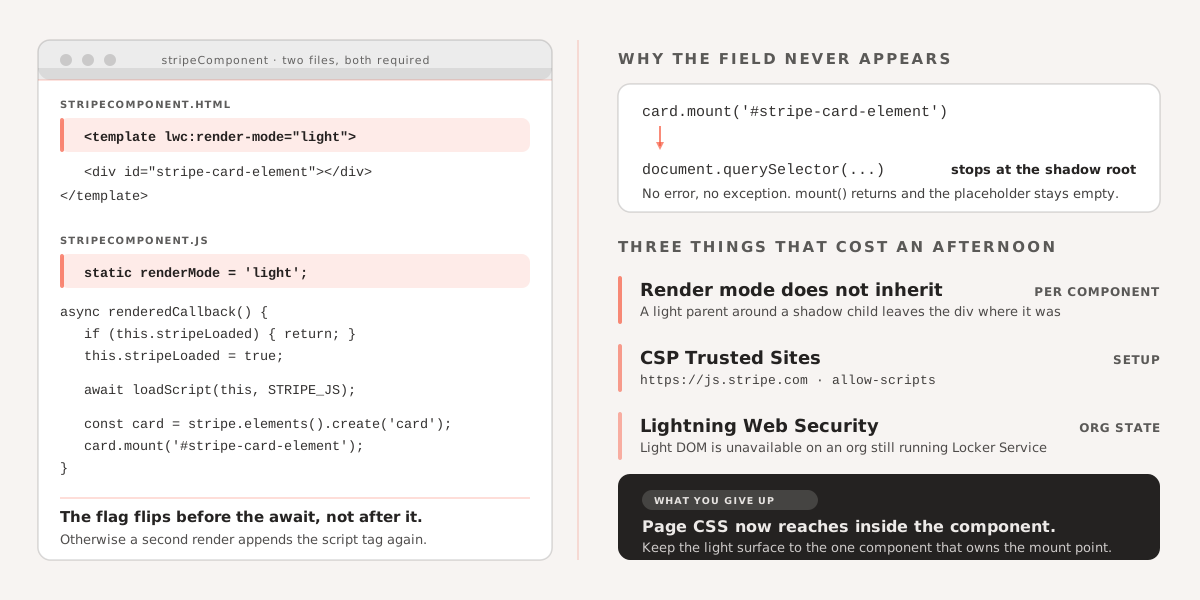
Drop Stripe Elements into a Lightning Web Component the obvious way and the card field never appears. No error, no exception — the script loads, mount() returns, and the placeholder stays empty.
The cause is not security policy. It is that Stripe mounts by CSS selector:
card.mount('#stripe-card-element');Internally that resolves to a document.querySelector. By default an LWC renders into a shadow root, and document.querySelector does not cross shadow boundaries. Stripe looks for your div, finds nothing, and quietly gives up.
Light DOM fixes it because it removes the shadow root, not because it relaxes any sandbox. The component’s markup renders directly into the document tree, where an outside library’s selector can reach it. That is the whole mechanism.
Render mode is per component, and it does not inherit
This is the part that costs people an afternoon. Setting light render mode on a parent does not make its children render light. Each component decides for itself, so the component that owns the mount point is the one that has to be light — a light parent wrapping a shadow child leaves the div inside a shadow root exactly as before.
Both files need changing. In the template:
<template lwc:render-mode="light">
    <div id="stripe-card-element"></div>
</template>
And in the class:
import { LightningElement } from 'lwc';
import { loadScript } from 'lightning/platformResourceLoader';

export default class StripeComponent extends LightningElement {
    static renderMode = 'light';

    stripeLoaded = false;

    async renderedCallback() {
        if (this.stripeLoaded) {
            return;
        }
        this.stripeLoaded = true;

        await loadScript(this, 'https://js.stripe.com/v3/');

        const stripe = Stripe('your_publishable_key');
        const card = stripe.elements().create('card');
        card.mount('#stripe-card-element');
    }
}
Two details in there are worth calling out.
Set the guard flag before the await, not in the load callback. renderedCallback fires on every re-render, and an async load leaves a window in which it can fire again before the first script has finished. Flipping the flag afterwards means the script tag gets appended twice.
Use loadScript rather than building a <script> element by hand. It deduplicates repeated loads across components, returns a promise you can await, and goes through the platform’s own loading path instead of around it.
The CSP setting everyone forgets
None of the above works until Stripe’s domain is allowed. In Setup, go to CSP Trusted Sites, add https://js.stripe.com, and enable it for allow-scripts. Without it the browser blocks the script outright and the console shows a Content Security Policy violation rather than anything Salesforce-specific.
Light DOM also requires Lightning Web Security to be enabled in the org. It is not supported under the older Locker Service, so on an org that has not migrated, this approach is unavailable regardless of how the components are written.
When not to reach for this
Light DOM removes the style and DOM encapsulation the shadow root was giving you. Page-level CSS now applies to the component’s internals, and other code on the page can query and modify them.
That is an acceptable trade for a payment field that has to be mounted by a third-party library. It is not one worth making because a stylesheet was inconvenient. Keep the light-DOM surface as small as it can be — one component that owns the mount point, with the rest of the feature in ordinary shadow components around it.
If you are building custom Salesforce Lightning components and need help with complex integrations or third-party libraries, see how we approach Salesforce development.