A contest that collected four thousand entries is worth nothing while those entries sit in ViralSweep and your sales team works out of Salesforce. The question is only how the data gets across — and the three available routes differ enough that picking the wrong one is expensive to undo.
Pick the route before you build anything
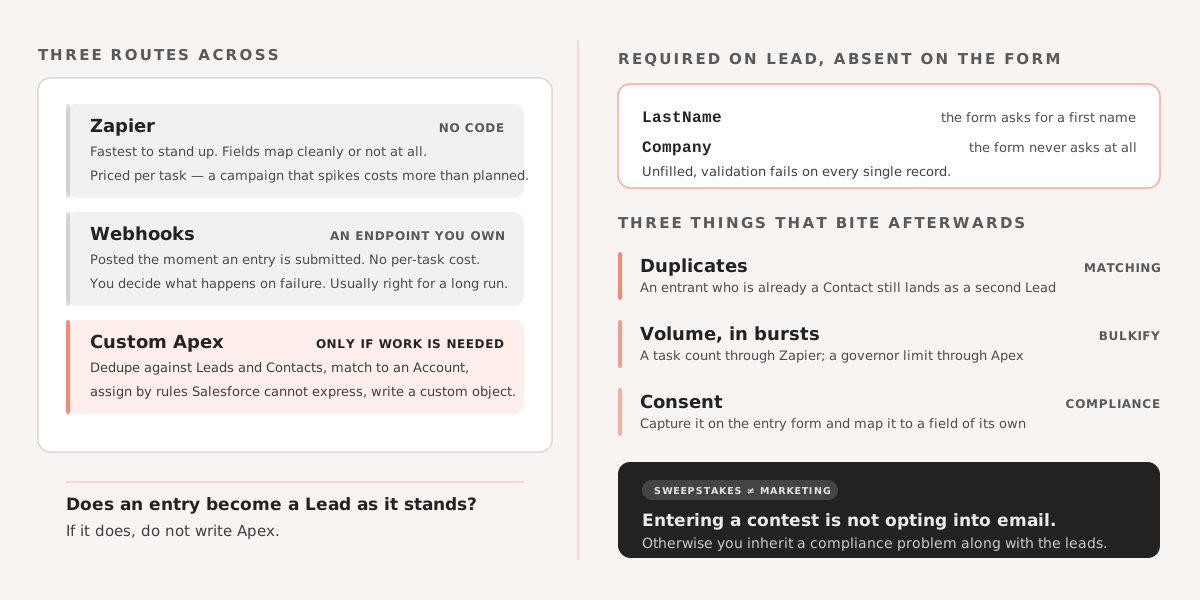
Zapier is the fastest to stand up and needs no code. It suits campaigns where entries arrive at a modest rate and map cleanly onto Lead fields. You pay per task, so a viral campaign that spikes will cost more than you planned, and the field mapping lives in Zapier rather than anywhere your team version-controls.
Webhooks post each entry to an endpoint you own the moment it is submitted. More setup than Zapier, no per-task cost, and you control what happens on failure. This is usually the right answer for a campaign that runs continuously.
Custom Apex is worth it when entries need real work on arrival — deduplicating against existing Leads and Contacts, matching to an Account, applying assignment logic that Salesforce’s own rules cannot express, or writing to a custom object rather than Lead. Our implementation is on GitHub.
The decision hinges on one question: does an entry become a Lead as-is, or does something have to happen to it first? If it is the former, do not write Apex.
Setting it up
Configure the ViralSweep campaign to collect the fields you actually need in Salesforce, including any custom ones. Adding a field after entries start arriving means the early records are missing it permanently.
Then map ViralSweep’s fields to Salesforce fields. LastName and Company are required on Lead, and a contest form that only asks for a first name and email will fail validation on every single record. Decide up front what fills those — a form field, or a default like “Unknown” that your team can filter on later.
Test with real submissions through the live form before the campaign opens. Testing the Zap or webhook in isolation misses the failures that matter: a name with an apostrophe, a duplicate email, a required field left blank.
Three things that bite afterwards
Duplicates. The same person entering twice, or an entrant who is already a Contact, will create a second Lead unless something stops it. Salesforce’s duplicate rules handle the simple cases; anything involving an existing Contact usually needs Apex.
Volume. A campaign that goes viral generates entries in bursts. If they arrive through Zapier, that is a task-count problem. If they arrive through Apex, it is a governor limit problem — bulkify the handler and do not write per-record callouts.
Consent. Contest entrants opted into a sweepstakes, which is not the same as opting into marketing email. Capture the marketing consent separately on the entry form and map it to a field, or you inherit a compliance problem along with the leads.
Connecting marketing tools to Salesforce is one of the most common projects we take on. If your data is not flowing the way it should, get in touch and we can help you work through it.