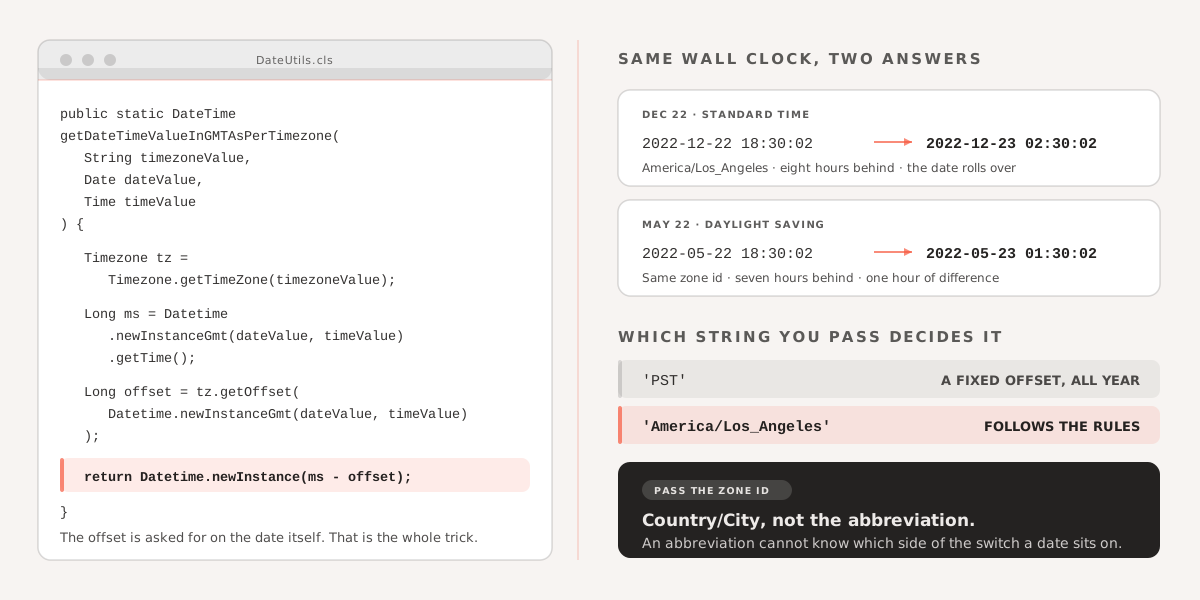
Some time we have to give ability to user to choose date and time and timezone separately and basis on that we have to calculate gmt value of them. Just one use case that a person define an event on Oct 8, 2020 at sharp 9:00 AM in PST. And basis on this we have to show event information on public site where any user can come and see ongoing or upcoming events in their timezone or other timezone as well. So in this case we required GMT conversion. One small function will do all the things.
Tip: For daylight saving please use Country/City zone ids instead of Abbreviation(EST, EDT, PST etc.) This way we can calculate the offset properly.
America/New_York - EST America/Los_Angeles - PST America/Chicago -CST America/Denver - MST Pacific/Honolulu - HST
  /**
  * Make sure that Timezone value should be java date time zone ids
  * https://docs.oracle.com/javase/8/docs/api/java/time/ZoneId.html
  * Also for daylight saving please use Country/City zone ids instead of Abberivation for example :
  America/New_York  - EST
  America/Los_Angeles - PST
  America/Chicago -CST
  America/Denver - MST
  Pacific/Honolulu - HST
  */

  public static DateTime getDateTimeValueInGMTAsPerTimezone(
    String timezoneValue,
    Date dateValue,
    Time timevalue
  ) {
    Timezone tz = Timezone.getTimeZone(timezoneValue);
    Long dateTimeInMiliseconds = Datetime.newInstanceGmt(dateValue, timevalue)
      .getTime();
    Long timezoneOffset = tz.getOffset(
      Datetime.newInstanceGmt(dateValue, timevalue)
    );
    return Datetime.newInstance(dateTimeInMiliseconds - timeZoneOffset);
  }
/*
Use case 1 :  Daylight saving testing
  Date myDate = Date.newInstance(2022, 12, 22);
  Time myTime =Time.newInstance(18, 30, 2, 20);
  String timeZone = 'America/Los_Angeles';
  DateTime GMT = getDateTimeValueInGMTAsPerTimezone(timeZone,myDate,myTime);
  System.debug('GMT -->'+GMT); //output 2022-12-23 02:30:02 (this is the GMT)

Use case 2 :  Non Daylight saving testing
  Date myDate = Date.newInstance(2022, 05, 22);
  Time myTime =Time.newInstance(18, 30, 2, 20);
  String timeZone = 'America/Los_Angeles';
  DateTime GMT = getDateTimeValueInGMTAsPerTimezone(timeZone,myDate,myTime);
  System.debug('GMT -->'+GMT); //output 2022-05-23 01:30:02 (this is the GMT)


*/
If you are working with time formatting in the same codebase, How to Format an Apex Time Value as a Readable String covers the display side of the same problem.