When Salesforce needs to kick off work on Heroku or AWS, the default move is to stand up a REST endpoint on the other side and call it from Apex. That works, but you now own an API: authentication, versioning, uptime, and a caller that sits waiting for a response it does not need.
If the work is genuinely asynchronous — generate the report, process the file, sync the batch — a message queue fits better. Salesforce publishes and forgets; the consumer picks the message up whenever it is ready; neither side has to be available at the same moment.
Apex cannot speak AMQP, so use the HTTP API
This is the constraint that shapes everything else. Apex makes HTTP callouts and nothing else — there is no AMQP client, and no way to hold the persistent connection one would need.
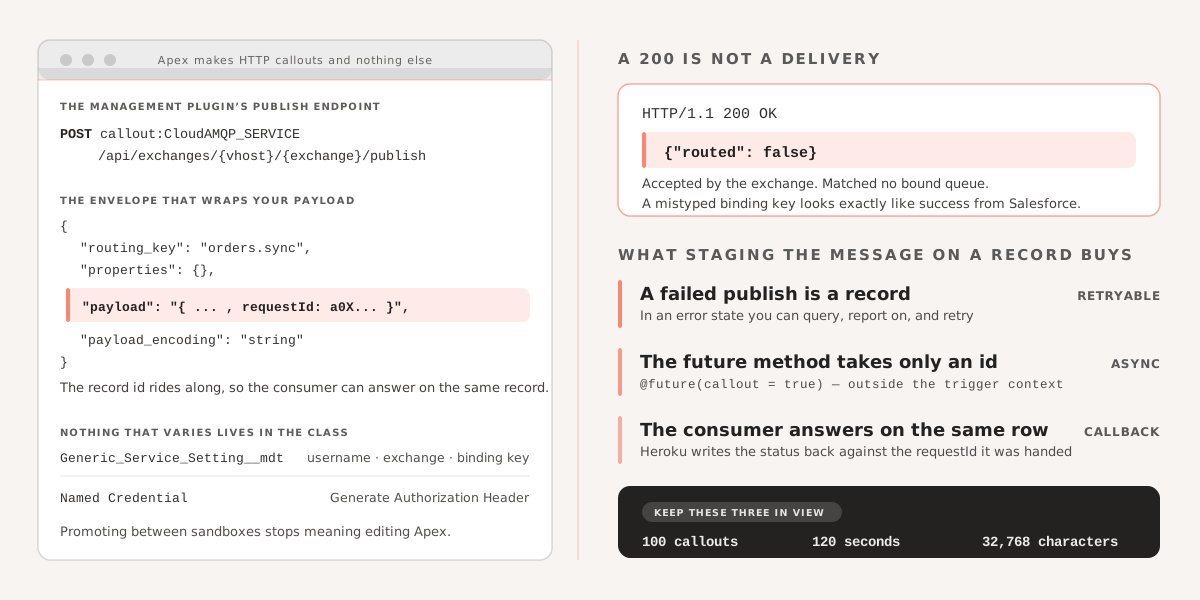
RabbitMQ’s management plugin exposes an HTTP publish endpoint, which is the way in:
POST /api/exchanges/{vhost}/{exchange}/publishThe body wraps your payload with a routing key and an encoding hint. That wrapping is the only unusual part of the Apex; everything else is an ordinary callout.
A note on throughput: the HTTP API is not the high-performance path — AMQP is, and a busy consumer fleet should use it. For messages originating in Salesforce the volumes are bounded by Apex callout limits long before RabbitMQ notices, so the tradeoff is not a real one here.
Keep credentials out of the code
The endpoint above is referenced as callout:CloudAMQP_SERVICE, a Named Credential. Configure it with password authentication and Generate Authorization Header enabled, and Salesforce attaches the basic auth header for you. The RabbitMQ username and password come from the add-on itself.
Everything that varies per environment — username, exchange name, binding key — sits in a custom metadata type rather than in the class, so promoting between sandboxes does not mean editing Apex.
Stage the message in a record first
The pattern worth copying here is not the callout. It is that the payload lives on a Generic_Service_Sync__c record before anything is sent, and the record carries the status, the response, and any error back.
That buys three things a direct callout does not. A failed publish is a record in an error state that you can query, report on, and retry. The @future(callout = true) method takes only the record ID, so the callout happens outside the trigger context that created it. And because the record ID is injected into the payload as requestId, the consumer on Heroku can call back and update the same record when the work finishes.
public class RestCallToGenericService {
    public static Generic_Service_Sync__c postRequestToService(Generic_Service_Sync__c record) {
        String SERVICE_URL = 'callout:CloudAMQP_SERVICE';
        String jsonData = record.Data__c;

        HTTPResponse hs = null;
        Generic_Service_Setting__mdt settings = Generic_Service_Setting__mdt.getInstance('Service_Setting_Record');
        String rabbitMQUserName = settings.RabbitMQ_UserName__c;
        String rabbitMQBindingKey = settings.RabbitMQ_Binding_Key__c;
        String exchangeName = settings.RabbitMQ_Exchange_Name__c;

        try {
            Map<String, Object> jsonDataMap = (Map<String, Object>) JSON.deserializeUntyped(jsonData);
            jsonDataMap.put('requestId', record.id);
            jsonData = JSON.serialize(jsonDataMap);

            HttpRequest httpReq = new HttpRequest();

            String endpoint = SERVICE_URL + '/api/exchanges/' + rabbitMQUserName + '/' + exchangeName + '/publish';
            System.debug('endpoint' + endpoint);
            httpReq.setEndpoint(endpoint);
            httpReq.setMethod('POST');
            String payload = serializeAmqpRequests(jsonData, rabbitMQBindingKey);
            httpReq.setBody(payload);
            Http http = new Http();
            hs = http.send(httpReq);

            if (hs.getStatusCode() == 200) {
                record.Status__c = 'Sent to Service';
                String response = 'Response ' + hs.getBody();
                String message = response.length() > 32768 ? response.subString(0, 32768) : response;
                record.Response__c = message;
                record.Error_Details__c = '';

            } else {
                Integer statusCode = hs != null ? hs.getStatusCode() : 500;
                String body = hs != null ? hs.getBody() : 'response is null';
                String errorDetails = 'Unable to post the request to Service status Code ' + statusCode + ' Body : ' + body;
                String message = errorDetails.length() > 32768 ? errorDetails.subString(0, 32768) : errorDetails;

                record.Status__c = 'Error';
                record.Error_Details__c = message;
                record.Response__c = '';
            }
        } catch (Exception e) {
            Integer statusCode = hs != null ? hs.getStatusCode() : 500;
            String body = hs != null ? hs.getBody() : 'response is null';
            String errorDetails = 'Unable to post the request to Service due to FATAL Error - status Code ' + statusCode + ' Body : ' + body + ' stack trace - ' + e.getStackTraceString();
            String message = errorDetails.length() > 32768 ? errorDetails.subString(0, 32768) : errorDetails;
            record.Status__c = 'Error';
            record.Error_Details__c = message;
            record.Response__c = '';
        }

        return record;
    }

    @future(callout = true)
    public static void postRequestToServiceFuture(String recordId) {
        Generic_Service_Sync__c record = [SELECT Id, Account__c, Action__c, Service_Record_Id__c, Data__c, Status__c FROM Generic_Service_Sync__c WHERE Id = :recordId];
        postRequestToService(record);
    }

    private static String serializeAmqpRequests(String payload, String rabbitMQBindingKey) {
        rabbitMQBindingKey = rabbitMQBindingKey == null ? '' : rabbitMQBindingKey;
        JSONGenerator generator = JSON.createGenerator(false);
        generator.writeStartObject();
        generator.writeStringField('routing_key', rabbitMQBindingKey);
        generator.writeFieldName('properties');
        generator.writeStartObject();
        generator.writeEndObject();
        generator.writeStringField('payload', payload);
        generator.writeStringField('payload_encoding', 'string');
        generator.writeEndObject();
        return generator.getAsString();
    }
}
The truncation to 32,768 characters in three places is not decoration — that is the long text area limit, and an unusually verbose error body will hit it.
The gotcha: a 200 does not mean the message was routed
The code above treats HTTP 200 as success, which is the obvious reading and not quite right. The publish endpoint returns 200 with a body of {"routed":false} when the message was accepted by the exchange but matched no bound queue.
That is exactly what a mistyped binding key produces, and it is a bad failure mode: Salesforce reports everything sent, and the messages go nowhere. If you adapt this class, parse the response body and check routed before writing the success status.
Two limits are worth keeping in view while you build on this: 100 callouts per transaction, and 120 seconds of cumulative callout time.
If you are working on asynchronous integration between Salesforce and Heroku or AWS and want to talk through the right approach for your situation, get in touch.