
Here’s a question every Salesforce team gets asked eventually, usually by someone senior, usually at the worst possible moment: how healthy is our org?
The honest answer most of us give is some version of “…uh.”
We know the parts that hurt. The flow that fell over last quarter. The Apex class nobody will touch because the person who wrote it left in 2019. But the whole picture? The four thousand things you’ve never actually looked at? Nobody knows. You find out the way you always find out. Something breaks in production, on a Friday, right before a long weekend.
We got tired of that answer. So we built a tool that gives you a real one.
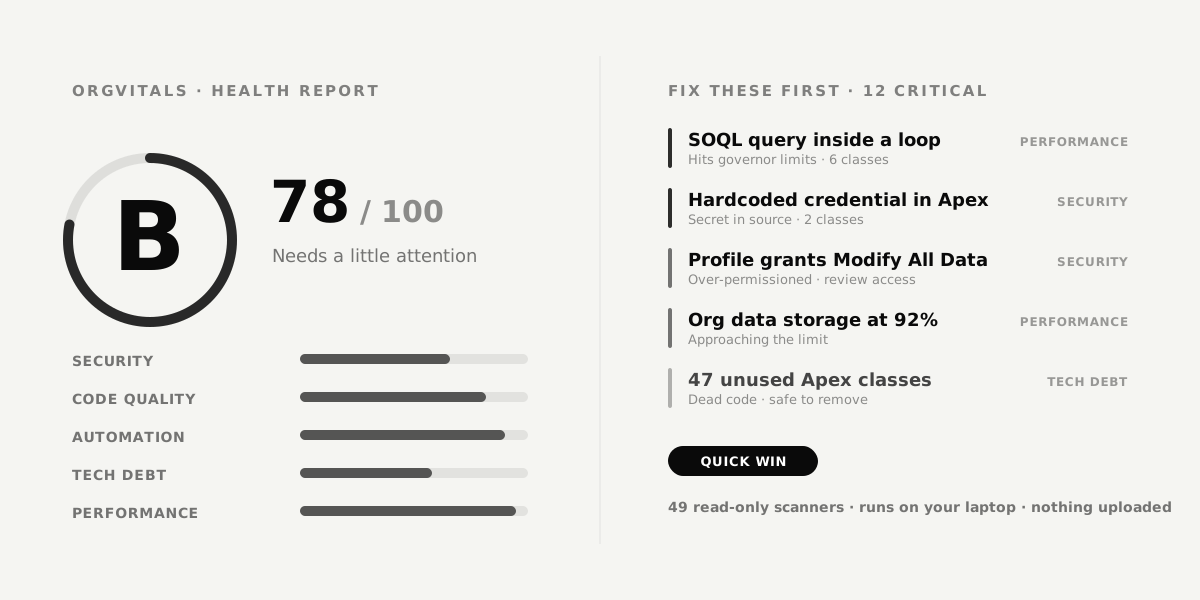
It’s called OrgVitals. It’s a desktop app that runs on your laptop, it only ever reads your org, and right now it’s completely free. Point it at a Salesforce org, wait a few minutes, and you get a single letter grade from A to F plus a ranked list of what to fix first.
Key Takeaways
- OrgVitals is a free desktop app that scans a Salesforce org and grades its health from A to F.
- It runs 49 read-only checks across Security, Code Quality, Automation, Tech Debt, and Performance, then tells you what to fix first.
- Everything stays on your machine. Your metadata is never uploaded, and nothing is written back to the org.
- It was built for the admin who inherited a mess, the developer scared to delete code, and the consultant sizing up a brand-new client org.
- Made by CloudAlgo. Free right now, no credit card, no seat limits.
Why nothing already tells you this
Plenty of tools show you one slice of org health. Not one of them shows you the whole thing in a single place.
There are several buttons you can already press. They each cover a corner of the room:
- Health Check grades your security settings. Password policies, session timeouts, that sort of thing. Useful, but it’s a score about configuration, not “is my Apex a minefield.”
- Optimizer produces a tidy report. That report lands in an email. The email is never opened again.
- PMD and Code Analyzer genuinely read Apex, and they read it well. But they only do Apex, they want Java installed, and they live on the command line. Your admin is not running them before a release.
- The SaaS scanners will happily tell you everything. Right after you upload your org’s metadata to their cloud and put a per-seat subscription on the company card.
So you end up with four half-answers and no single honest one. OrgVitals exists to be the whole answer: your entire org, top to bottom, graded, with the dangerous stuff floated to the top.
What OrgVitals actually does
It reads a snapshot of your org’s metadata once, runs 49 checks against it, and turns the result into one grade and a fix list you can actually work through.
You’ve already logged into your orgs with the Salesforce CLI, the sf command every Salesforce dev has installed. OrgVitals uses that session to pull a read-only copy of the metadata: Apex, flows, LWC, profiles, permission sets, objects, fields, the lot. Then it runs 49 scanners grouped into five categories, and a few minutes later hands you this:
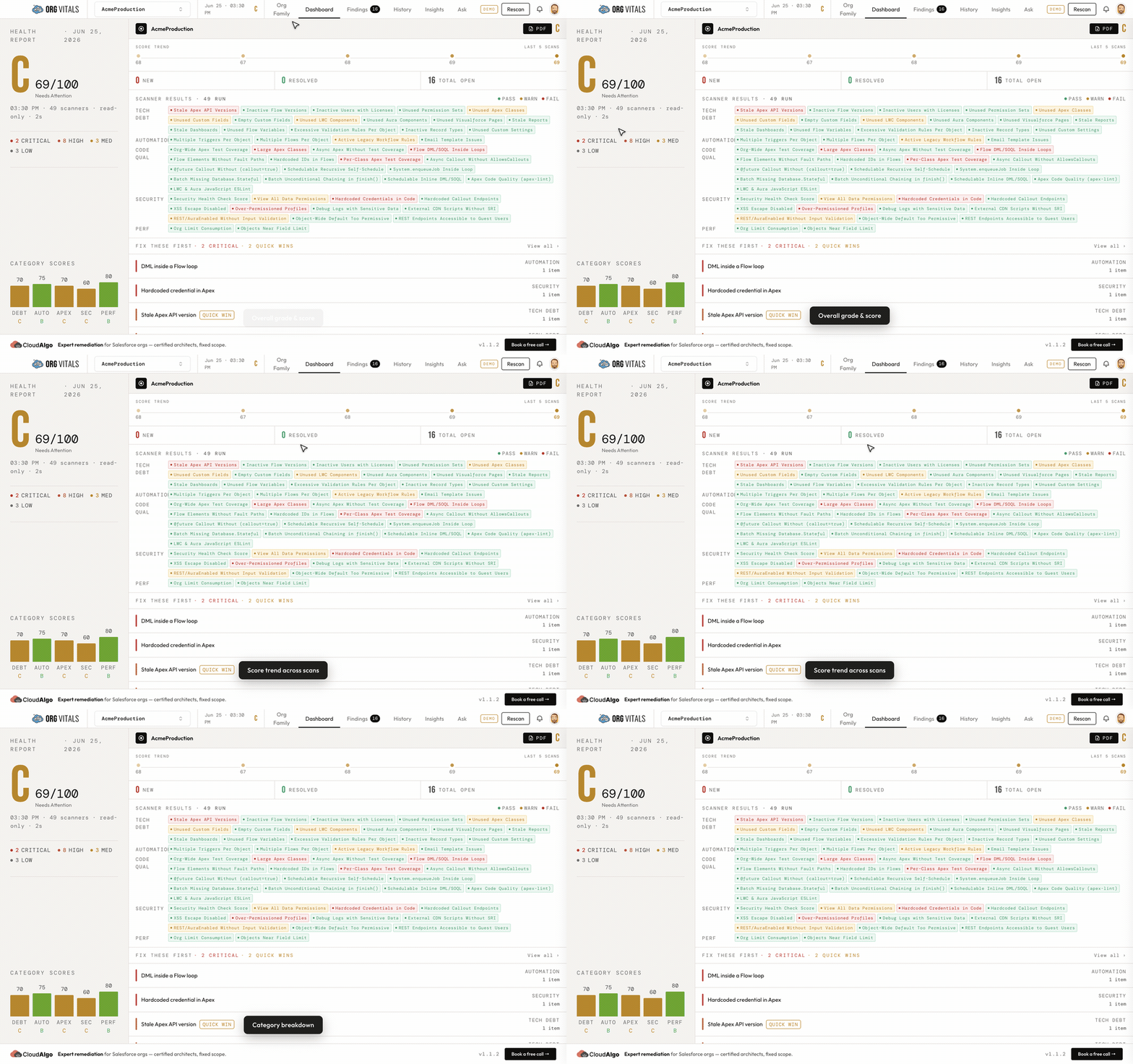
One grade. Five category scores. A “Fix These First” list with the critical items and the quick wins on top. Click any finding and it explains itself and links straight to the component it’s complaining about.
Two things we care about more than anything:
It never writes to your org. Every scanner reads. Nothing creates, edits, or deletes. Even the cleanup feature only generates a destructiveChanges.xml for you to review and deploy yourself. OrgVitals never pulls the trigger.
Your metadata never leaves your machine. The snapshot, the results, your whole scan history, all of it sits in a local database on your laptop. We never see it. (The one exception is the optional AI assistant, which is off until you turn it on and only talks to Anthropic under your own key. We say so plainly inside the app.)
It does a lot more than hand you a grade, too. A few things people don’t expect from a free desktop app:
- See what depends on what. The Insights view maps a live dependency graph of your org. Pick any component and you can see its blast radius before you touch it, so “this class looks unused” turns into “nothing references this class.”
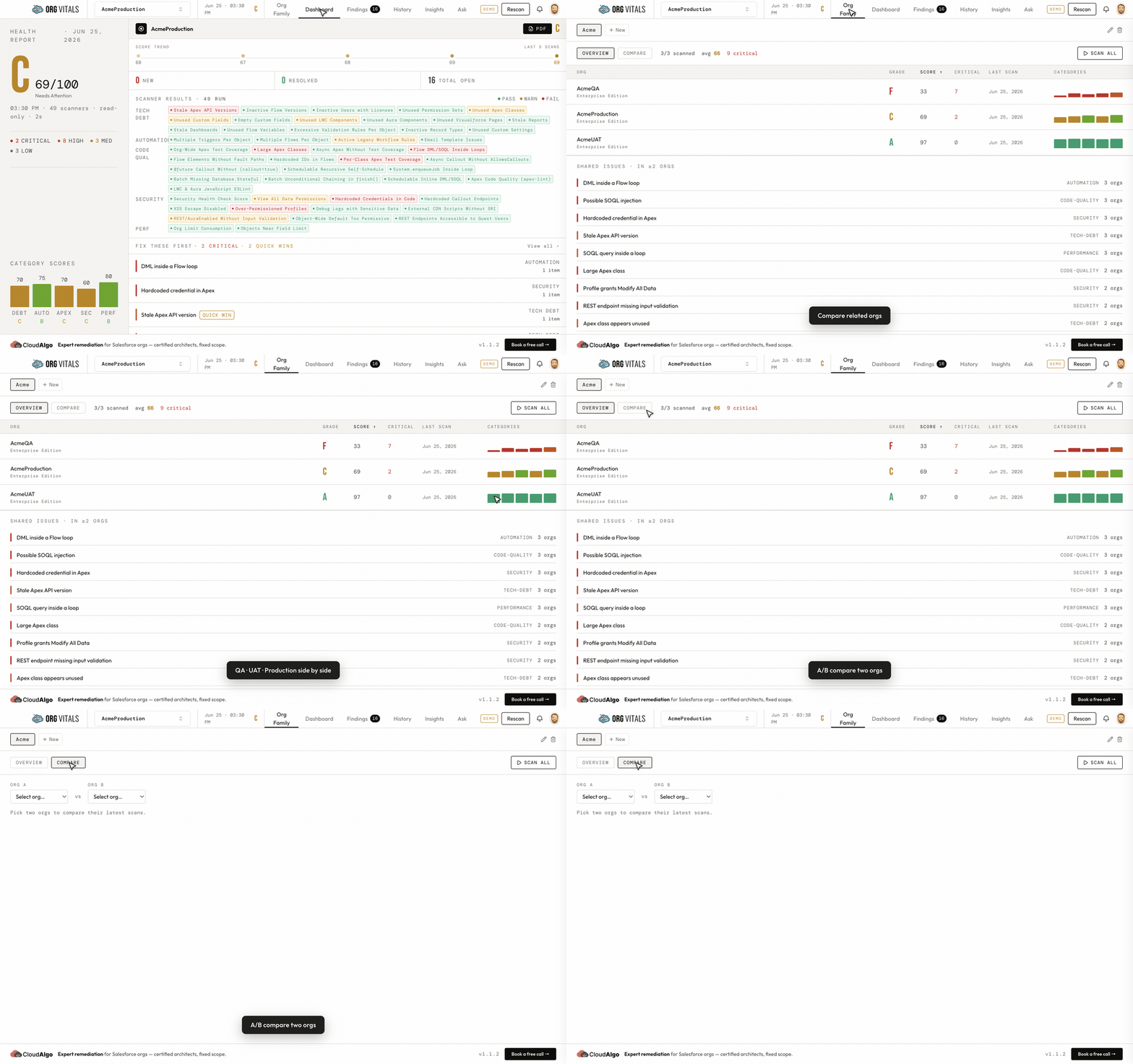
- Compare two orgs, line by line. Group production and its sandboxes into an Org Family, then diff their grades, their metadata, and even a single component’s source code side by side. Perfect for “why does QA pass and prod doesn’t.”
- Hunt down tech debt. It calls out unused Apex classes, dead fields, stale reports, abandoned automation, and the rest of the stuff quietly rotting in the org, then generates a deletion package you review and deploy yourself.
- Ask it questions in plain English. Ask Vita, the opt-in AI assistant, answers things like “which flows have the highest risk?” or “which profiles have Modify All Data?” so you’re not writing SOQL to audit your own org.
Who it’s for
Four kinds of people get the most out of this, and none of them are “SEO managers.”
The admin who inherited the mess. You took over an org built by three admins you’ve never met, full of automation you’re scared to switch off because you don’t know what leans on it. OrgVitals hands you the whole board at once, then lets you triage. Mark a finding fixed, ignored, or snoozed and the status sticks across future scans. The dashboard even shows a “managed score,” which is what your grade would be once you finish the work you’ve already planned. A disaster becomes a to-do list.
The developer who’s scared to delete anything. That class looks unused. Is it, though? The Insights view maps the dependency graph, so you can see a component’s blast radius before you remove it. “No references found” is a wonderfully calming thing to read right before a deploy.
The consultant walking into a new client org. This one is personal, because it’s us. When someone brings you in to fix their Salesforce, week one is archaeology: figuring out how bad it is before you can even quote the work. OrgVitals turns that into a ten-minute scan and an honest baseline. And because it handles whole families of orgs, you can line up a sandbox against production and see exactly where they’ve drifted apart.
The client, or your boss. They don’t want a 200-row spreadsheet. They want to know if the thing is getting better. A letter grade and a trend line pointing up is a language everyone in the room understands, including the person who approves the budget.
What makes it different
Short version: it’s local, it’s one grade instead of five dashboards, and it’s free. The longer version:
- It runs offline, on your hardware. Read-only, nothing uploaded. No security review to let an outside vendor scan your production org.
- It gives one honest grade. Security, code, automation, tech debt, and performance, rolled into a number you can act on and defend in a meeting.
- Your triage survives. Notes and dismissals carry across re-scans, so progress accumulates instead of resetting every time you run it. That is the single feature people tell us they didn’t know they wanted.
- The AI is optional. Ask Vita answers plain-English questions about your org, like “which flows have the highest risk.” Off by default, your own key, easy to ignore entirely.
- It’s free. Right now, no card, no seat count, no trial clock in the corner.
The honest part
OrgVitals is made by us, CloudAlgo, and we fix Salesforce and Heroku orgs for a living. That is the whole reason it’s free.
Giving away a tool that took months to build sounds like bad business until you think about what the tool does. It shows you, in specific detail, everything wrong with your org. That is roughly the most honest sales pitch we could make. Run OrgVitals, fix all of it yourself, and never speak to us. Genuinely, that’s a fine outcome, and you’ll have a healthier org for it. But if the list comes back long and you’d rather hand it to people who do this every day, well, that part is our actual job.
So that’s the deal, stated plainly. It’s free now. We’re not going to pretend we built it out of pure generosity. We built something useful, we’re giving it away, and if it earns us a conversation, great. If it just earns you a better org, also great.
Frequently asked questions
Is it actually free? Yes. Right now there’s no cost, no credit card, and no per-seat pricing. It’s free while we grow it and get it in front of people. If that ever changes, we’ll be upfront about it well ahead of time.
Will it change anything in my org? No. Every scanner is strictly read-only. The most it will ever do is generate a deletion package for dead metadata, which you review and deploy yourself if you want to.
Do I need Java or a cloud account? No. It’s a single desktop app. You need the Salesforce CLI (which you almost certainly already have) and a Google sign-in for licensing. No JVM, no vendor cloud, no metadata upload.
How is this different from Salesforce Health Check? Health Check scores security configuration only. OrgVitals grades security and code quality and automation and tech debt and performance, in one place, and ranks what to fix first.
Try it on your scariest org
Point it at the org you’re most afraid of. That’s genuinely the fastest way to understand what it does.
It runs on macOS, Windows, and Linux, it’s free, and you’ll have your first grade in about five minutes. Download OrgVitals Read the full guide Talk to us about fixing what it finds